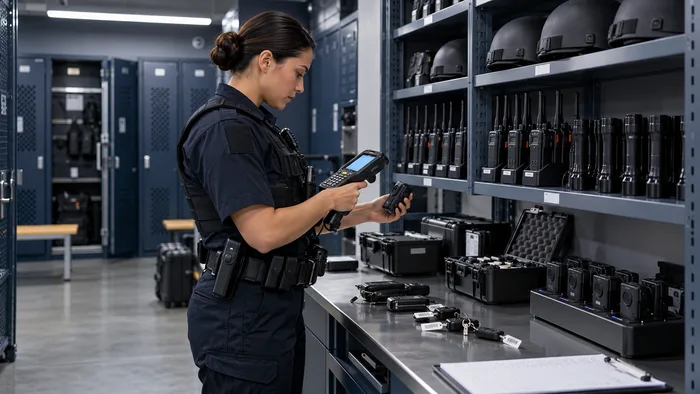
Government asset management software for accountable public service
Government asset management software helps teams manage public property, IT equipment, vehicles, tools, radios, emergency-response gear and other operational assets across departments and locations. AssetSeal connects each item with its custodian, status, location, documents and lifecycle history.
Government and municipal assetsPolice and emergency equipmentDepartment and facility audits
Portable radio PR-1049Police operationsShift supervisorIssuedStation 4On record
Thermal camera TC-208Fire and rescueEngine companyReadyStation 2On record
Laptop LT-620Municipal administrationFinance clerkIn useCivic centreOn record
Traffic-control kit TK-41Public worksField crewAvailableYard storeOn record
Inspection tablet IT-88FacilitiesBuilding servicesService dueCity hallOn record
AdministratorDepartment managerAuditorViewer
Public asset registerEquipment issue and returnDepartment and location hierarchyRFID, NFC, barcode and QRMaintenance and warranty historyControlled transfers and disposalsPolice and fire equipmentPublic works toolsMobile asset auditsGeotagged verificationPublic asset registerEquipment issue and returnDepartment and location hierarchyRFID, NFC, barcode and QRMaintenance and warranty historyControlled transfers and disposalsPolice and fire equipmentPublic works toolsMobile asset auditsGeotagged verification
Public works inventory
Verify municipal equipment, tools and facility assets against the expected register.
Equipment custody
Record when radios, devices and operational equipment are issued, transferred or returned.
Emergency equipment verification
Check breathing apparatus, rescue tools and station assets against the fire department register.
The challenge
Public assets are difficult to govern when records are fragmented
Government equipment moves between departments, facilities, employees, vehicles and operational sites. When records are maintained separately, it becomes harder to confirm responsibility and make informed decisions.
TodayWith AssetSeal
01
Departments maintain disconnected records
Individual departments may use separate spreadsheets or systems, creating conflicting information about ownership, location and asset status.
One governed public asset register
Keep one authorized record for property, equipment and issued assets.
02
Issued equipment loses clear custody
Radios, laptops, body cameras, tools, keys and mobile equipment can pass between employees, stations and shifts without a consistent handover record.
Documented equipment issue and return
Connect each item with the responsible employee, unit, vehicle or location.
03
Physical verification remains labour-intensive
Manual inventory checks take time, particularly when equipment is distributed across buildings, stations, vehicles, storage rooms and public works locations.
Mobile, technology-assisted asset verification
Use RFID, NFC, barcode or QR checks where each asset category needs them.
04
Transfers and disposals lack supporting history
Assets may be transferred, written off or disposed of without consistent approvals, supporting documents or an easily reviewed history.
Controlled lifecycle workflows
Route transfers, write-offs and disposals through configured approval steps.
Capabilities
Asset management capabilities for government operations
AssetSeal provides a structured way to manage public property while allowing departments to follow workflows appropriate to their responsibilities. It covers government-owned equipment, municipal facilities assets, public works tools and police and fire equipment. It does not replace a roads, bridges or utilities engineering system.
01
Consolidated public asset register
Maintain one authorized record for government property, IT equipment, public works tools, facility assets and emergency-service equipment.
03
Department and location hierarchy
Organize assets by organization, department, facility, station, building, floor, room, vehicle or operational area.
05
Maintenance and warranty history
Keep service activity, warranty information, inspection documents and related records with the corresponding asset.
AssetSeal coreOne governed record
02
Equipment issue and return
Record when equipment is issued, transferred or returned and connect it with the responsible employee, unit, vehicle or location.
04
RFID, NFC, barcode and QR verification
Select the identification method appropriate to each asset category. Where configured, geotagging can also record the location of a verification activity.
06
Controlled transfers and disposals
Route transfers, write-offs and disposals through configured approval steps while retaining authorized decisions and supporting documentation.
How it works
From identification to accountable action
01
Identify
Register the asset and apply an appropriate RFID, NFC, barcode, QR code or tamper-evident label.
02
Assign
Connect the asset with its department, custodian, station, facility, vehicle or approved operating location.
03
Verify
Conduct scheduled checks and compare observed assets with the expected departmental register.
04
Act
Investigate exceptions and initiate the appropriate transfer, return, service, write-off or disposal workflow.
Governance built in
Designed for accountable public asset records
Access controls, activity history, consistent records and reporting are built into the platform.
Configure permissions by department, facility, asset category and assigned responsibility.
Built in
02
Authorized activity history
Retain attributable records of approved assignments, transfers, verifications and lifecycle changes.
Built in
03
Consistent asset information
Keep ownership, custody, department, location, status and supporting documents together.
Built in
04
Structured reports and exports
Prepare information for management reviews, asset reconciliation and authorized audit processes.
Built in
Outcomes
What stronger public asset visibility supports
01
Authorized central teams can review public assets without removing operational responsibility from individual departments.
02
Departments can see which assets are issued, returned, transferred or awaiting follow-up.
03
Police, fire, public works and facilities teams can review equipment status, service information and verification history.
04
Transfers, write-offs and disposals can be supported by documented records and authorized decisions.
Who benefits
One asset record, useful to every public-sector team
Municipal and facilities teams
Manage facility equipment, public works tools, furniture, mobile assets and items distributed across civic locations.
Police and public-safety logistics
Track the issue, return, location and service history of radios, body cameras, mobile devices and other operational equipment.
Fire and emergency services
Maintain records for breathing apparatus, thermal cameras, medical bags, rescue tools, protective equipment and station assets.
Finance, procurement and internal audit
Use structured asset information to support purchasing reviews, physical reconciliation and authorized reporting.
Exchange approved data with existing government systems
AssetSeal can exchange approved asset data through configured APIs and structured import or export processes. Integration scope depends on the target system, security requirements and agreed implementation architecture.
Records and reportingRole-based accessActivity historyCustody recordsPublic asset register
Getting started
What a working session looks like
01
Assess
We review your departments, locations, asset categories, custody processes and current record-keeping approach.
02
Recommend
We recommend suitable workflows, identification methods and scanning options for your operational environment.
03
Demonstrate
We demonstrate AssetSeal using a municipal, police, fire, facilities or government-equipment scenario relevant to your organization.
FAQ
Questions government teams ask
Deployment options depend on the agreed architecture, security requirements and implementation scope. The available hosting model should be confirmed during solution design.
Role-based access can be configured by department, facility, asset category and function. Authorized central teams can retain consolidated oversight while departmental users work within their assigned responsibilities.
Yes. Transfers, write-offs and disposals can follow configured approval workflows. Authorized actions and decisions can be retained with the corresponding asset record.
Yes. Equipment can be associated with an employee, operational unit, station, facility or vehicle according to the configured workflow.
No. RFID, NFC, barcode and QR code identifiers can be selected according to the asset type, value, movement pattern and verification requirement.
No. AssetSeal records asset custody, assigned locations and authorized workflow activity. It is not intended as continuous employee surveillance.
Next step
Bring public assets under one governed record
Show us how equipment moves across your departments, facilities, stations and operational teams. We will review your current process and demonstrate how AssetSeal could support stronger asset visibility and accountability.
 Canada
 USA
USA UAE
UAE India
India UK
UK